Microsoft Windows レジストリ內(nèi)の ProductID 情報(bào)
Office の ProductID 情報(bào)を確認(rèn)するには、次の手順を?qū)g行します (確認(rèn)できない場(chǎng)合もあります)。
1. Microsoft Windows プログラムをすべて終了します。
2. [スタート] ボタンをクリックし、[ファイル名を指定して実行] をクリックします。
3. [名前] ボックスに regedit と入力し、[OK] をクリックします。
4. レジストリを展開(kāi)して、次のキーを探します。
HKEY_LOCAL_MACHINE\SOFTWARE\Microsoft\Windows\CurrentVersion\Uninstall
5. Uninstall キーには、英數(shù)字を組み合わせた長(zhǎng)い名前の GUID キーが複數(shù)表示される場(chǎng)合があります。
各 GUID は、コンピュータにインストールされているそれぞれのプログラムに固有のキーです。
6. GUID を 1 つクリックし、右側(cè)のウィンドウに表示される DisplayName を確認(rèn)します。
DisplayName が目的の Office プログラムでない場(chǎng)合、次の GUID をクリックします。
7. 目的の Office プログラムの GUID が見(jiàn)つかったら、ProductID キーを見(jiàn)つけて、[データ] 列の値をメモします。
注 : 使用しているバージョンの Office の ProductID が、コンピュータの Office の GUID に表示されない場(chǎng)合があります。
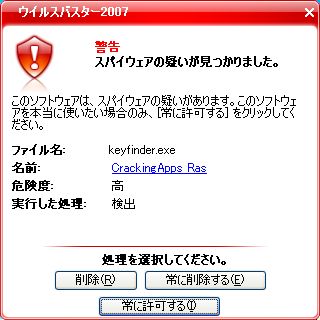
表示ができなかったため,次のソフトをダウンロード
http://www.magicaljellybean.com/keyfinder.shtml
削除した。
試していない
http://www.vector.co.jp/soft/win95/hardware/se217774.html
次のProduKey v1.26をダウンロードした。結(jié)果はOK。
http://www.nirsoft.net/utils/product_cd_key_viewer.html
ProduKey is a small utility that displays the ProductID and the CD-Key of MS-Office, Windows, Exchange Server, and SQL Server installed on your computer. You can view this information for your current running operating system, or for another operating system/computer - by using command-line options. This utility can be useful if you lost the product key of your Windows/Office, and you want to reinstall it on your computer.